Using Checkpoints to Sync Faster
Note: You can presently only use checkpoints with zedwallet; the command-line wallet.
Setup
- Right click this link and choose
Save link as...to download checkpoints.csv - Place checkpoints.csv in the same folder as your daemon(TurtleCoind) and wallet(zedwallet).
-
You can get them both from here if you don't have them already.
-
Make sure you shut down any GUI wallets, or any other instances of TurtleCoind.
Usage
Windows
- First, open a command prompt in the same directory as TurtleCoind.
- This can easily be done by moving to the TurtleCoind directory in Windows Explorer, then typing
cmdin the search bar and hitting enter:
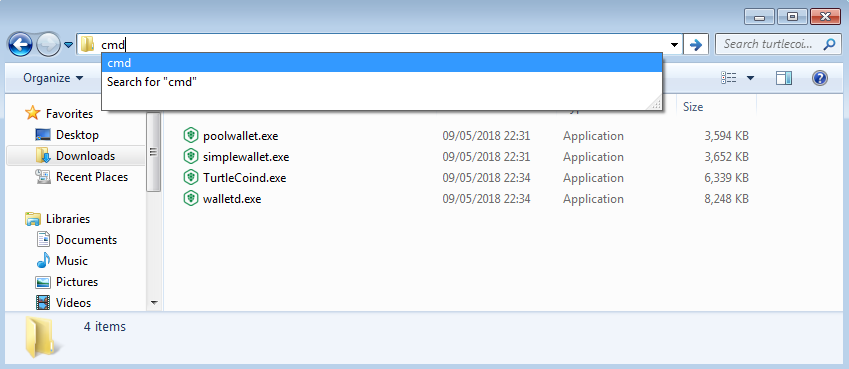 - Finally, type
 TurtleCoind.exe --load-checkpoints checkpoints.csv in the command prompt.
Linux, Mac
- First, open a command prompt in the same directory as TurtleCoind.
- You can use the
cdcommand to change to this directory. For example,cd Downloads/turtlecoin-v0.7.0 - Alternatively, your file manager may provide the ability to open a terminal in your current directory. Navigate to the folder with TurtleCoind in, and try right clicking, to see if you can open a terminal there:
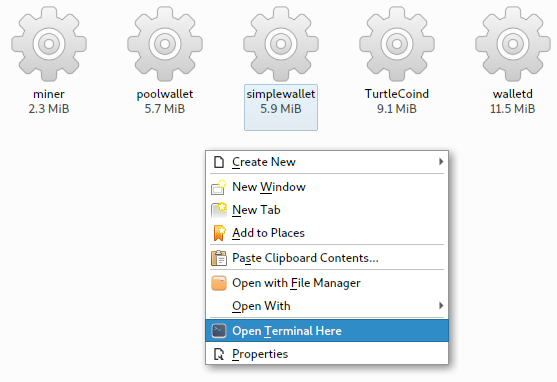
- Finally, type
./TurtleCoind --load-checkpoints checkpoints.csvin the terminal.
Expected Output
If you did the steps correctly, you should see something like this output.
2018-May-13 11:58:39.654478 INFO    Welcome to TurtleCoin v0.5.0.1260 ()
2018-May-13 11:58:39.654914 INFO    Module folder: TurtleCoind
2018-May-13 11:58:39.655249 INFO    Loading Checkpoints for faster initial sync...
2018-May-13 11:58:40.854979 INFO    Loaded 435695 checkpoints from checkpoints.csv
- TurtleCoind will then start syncing from checkpoints.
- If you are using the CLI wallet, then you can just wait for it to finish syncing, and open your wallet(leave the daemon open!).
- If you are using a GUI wallet, let it finish syncing, close it down by typing
exitin the window, then open your GUI wallet.
Common Errors
Invalid checkpoint file format
2018-May-13 12:10:08.325056 INFO    Loading Checkpoints for faster initial sync...
2018-May-13 12:10:08.339667 ERROR   Invalid checkpoint file format
2018-May-13 12:10:08.341758 ERROR   Exception: Failed to load checkpoints
- If you see output like the above, the file you are opening is either not a .csv file, or hasn't been downloaded correctly.
- Ensure you downloaded the file by right clicking, and choosing
Save link as.... - If you incorrectly chose the wrong file, you can accidentally download a html page instead.
- When you open up the file, it should have lots of lines like this:
0,7fb97df81221dd1366051b2d0bc7f49c66c22ac4431d879c895b06d66ef66f4c
1,8c9738f961a278486f27ce214d1e4d67e08f7400c8b38fe00cdd571a8d302c7d
2,2ef060801dd27327533580cfa538849f9e1968d13418f2dd2535774a8c494bf4
- If you absolutely can't get it working, you can make a new text file, copy all the content from here into it.
- Then save it as
checkpoints.csv(Select the filetype asAll Files (*.*)in Windows)
Failed to load checkpoints
2018-May-13 12:14:57.544286 INFO    Loading Checkpoints for faster initial sync...
2018-May-13 12:14:57.544569 ERROR   Could not load checkpoints file: checkpoints.csv
2018-May-13 12:14:57.544823 ERROR   Exception: Failed to load checkpoints
- If you see output like the above, it means the file isn't present in the directory you are in.
- Make sure you have placed the
checkpoints.csvfile in the same directory as TurtleCoind.
TurtleCoind.exe is not recognized / No such file or directory
C:\Users\gentoo>TurtleCoind.exe --load-checkpoints checkpoints.csv
'TurtleCoind.exe' is not recognized as an internal or external command,
operable program or batch file.
bash: ./TurtleCoind: No such file or directory
- If you see output like one of the above, it means your terminal isn't in the same folder as the TurtleCoind program.
- You can type
pwd(ordiron Windows) to see what folder you are currently in. - Try following the steps above to get into the right folder, then try again.
- If you type
ls(ordiron Windows), you should see the TurtleCoind program, if you are in the correct folder:
[turtlecoin-v0.7.0]λ ls
miner  poolwallet  simplewallet  TurtleCoind  walletd
IO error
2018-May-13 11:58:40.857058 INFO    Opening DB in /home/zach/.TurtleCoin/DB
2018-May-13 11:58:40.858174 ERROR   DB Error. DB can't be opened in /home/zach/.TurtleCoin/DB. Error: IO error: While lock file: /home/zach/.TurtleCoin/DB/LOCK: Resource temporarily unavailable
2018-May-13 11:58:40.873692 ERROR   Exception: IO error
- If you see output like the above, something else has got the database open already.
- Make sure you have closed down any other TurtleCoind's, GUI wallets, and walletd.
- Use a task manager to help you find any which might be running in the background, then try again.