How to Set Up XMR-Stak on Linux
Native binaries may be available for your distribution's package manager.
If no binaries are available, or you prefer to compile, follow these instructions-
Ubuntu 16.04
Guide sponsored by Monerise
-
If you want to use your GPU for mining, do the following-
-
for AMD GPU’s-
-
Install drivers for your card
-
download the latest APP SDK from here. It should have the name
AMD-APP-SDKInstaller-v(version number)-GA-linux64.tar.bz2-
Extract it
-
Open the terminal wherever it is located
-
(optional) name it to something simpler
-
In the terminal, type
./(name).sh -
After installing, you should be good.
-
-
-
for nVidia GPU’s-
-
Install drivers for your card
-
Download the latest CUDA Toolkit from here.
-
Download the base installer and follow the compilation instructions
-
Download every patch one-by-one in order and apply the patches
-
After that, you should be good.
-
-
-
-
Open the terminal and install dependencies by running this command-
sudo apt install libmicrohttpd-dev libssl-dev cmake build-essential libhwloc-dev -
Clone the package-
git clone https://github.com/fireice-uk/xmr-stak.git -
Make a directory-
mkdir xmr-stak/build -
Move over there-
cd xmr-stak/build -
Run cmake-
cmake ..- If you don’t have nVidia GPUs, type-
cmake .. -DCUDA_ENABLE=OFF- If you don’t have AMD GPUs, type-
cmake .. -DOpenCL_ENABLE=OFF- If you have neither (only CPU mining) type-
cmake .. -DCUDA_ENABLE=OFF -DOpenCL_ENABLE=OFF -
Finish building it-
make install -
XMR-Stak will now be located in
/home/user/xmr-stak/build/bin -
Type-
./xmr-stak -
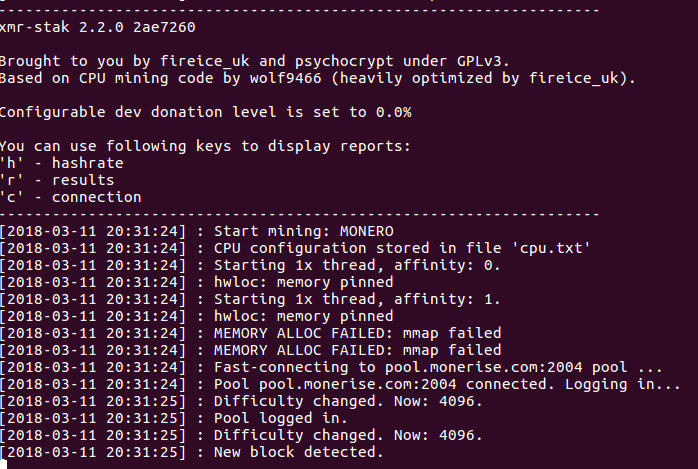
If you see something like this, that means it’s working!
XMR-Stak Setup and Configuration
Upon first launching XMR-Stak, the software will ask you several setup and configuration questions.
-
Please enter: - Do you want to use the HTTP interface? Unlike the screen display, browser interface is not affected by the GPU lag. If you don't want to use it, please enter 0, otherwise enter port number that the miner should listen onEnter
0, if you do not need to remotely check your hashrate.If you do need to, then enter a port number. Let's take the port number as
0101and your IP address as26.24.105.14as an example.To check the hashrate, enter in the address bar of your web browser,
<26.24.105.14>:<0101>. It should show a page with your rig's hashrate.
If you are checking from the same IP address, you can alternatively enter,localhost:<0101>Make sure to enter your own IP address if you enable this feature. You can choose any port you want!
-
- Please enter the currency that you want to mine:
     - aeon7
     - bbscoin
     - bittube
     - cryptonight
     - cryptonight_bittube2
     - cryptonight_masari
     - cryptonight_haven
     - cryptonight_heavy
     - cryptonight_lite
     - cryptonight_lite_v7
     - cryptonight_lite_v7_xor
     - cryptonight_superfast
     - cryptonight_turtle
     - cryptonight_v7
     - cryptonight_v8
     - cryptonight_v7_stellite
     - freehaven
     - graft
     - haven
     - intense
     - masari
     - monero
     - qrl
     - ryo
     - stellite
     - turtlecoin
     - plenteum
Enter
cryptonight_turtle -
- Pool address: e.g. pool.example.com:3333Choose a pool from any of the available pools that is closest to you and enter its URL (you will be able to add more later).
-
- Username (Wallet address or pool login):If you have not yet downloaded and ran the TurtleCoin core software to sync the blockchain and create a wallet, you can make a paper wallet to start mining towards now, and import the wallet later.
-
- Password (mostly empty or x):Enter
x. -
- Rig identifier for pool-side statistics (needs pool support). Can be empty:Leave it empty and press enter.
-
- Does this pool port support TLS/SSL? Use no if unknown. (y/N)In most cases,
Nis fine. -
- Do you want to use nicehash on this pool? (y/n)Enter
n(in case you do, entery). -
- Do you want to use multiple pools? (y/n)- Enter
yif you would like to add more pools. - Give them all a weight of
10if you're tired of reading, or if you want the best experience, give the pools nearest to you a higher number, and the ones further from you a lower number. - XMR-Stak will prioritize the highest weight pool, and fall back to the others if it cannot connect.
- If they are all given the same weight, it will connect to them in order of how they are listed, form top to bottom, in the configuration file.
- If you are on Windows ⅞, it will ask for administrator permission again. Click
Yesto grant it permission. - If you are on Windows 10, it will not ask for it again.
- Enter
Done! The miner will now start scanning your hardware and will begin mining. Awesome!
XMR-Stak will save your configuration in config.txt in the same directory from which it was first run.
Your configuration for pools(algorithm to mine, address, port etc) will be saved in pools.txt
The configuration of the device it mines(CPU/AMD/NVIDIA) will be saved in cpu.txt, amd.txt or nvidia.txt, respectively.
Run XMR-Stak again from the same directory to reuse the configuration.