Frequently Asked Questions
DeroGoldd / degwallet Issues
Q: I'm seeing an error in DeroGoldd Proof of work too weak for block... and the syncing stopped.
Answer
This occurs because of the blockchain forking, generally when one mining pool has a very large hashrate.
This can be fixed by re-syncing the correct blockchain from scratch. See here.
Q: I'm getting a "corrupted blockchain" error like this?
2018-May-07 15:52:19.877323 INFO    initializing core
2018-May-07 15:52:19.908530 INFO    Importing blocks from blockchain storage
2018-May-07 15:52:19.908530 ERROR   Corrupted blockchain. Block with index 428973 and hash aafa7fd33d476535188bdd9e86ba51bb5e058be8e52367b78e9c0c03e74299c5 has previous block hash 2c0cf6c07612b9e1ea19c6922a56746b83cb42c7b11edfc4b185572225bb0f20, but parent has hash 26189359b64d4bb357a04b102a42a01d2771a3f3d80db3ca1b7395a2aeaede4a. Resynchronize your daemon please.
2018-May-07 15:52:19.924135 INFO    Closing DB.
Answer
Re-sync your daemon from scratch(see below question)
Q: How can I re-sync the blockchain?
Answer
Close any DeroGold-related software, then go to %APPDATA%, and delete the DeroGold folder.
Reopen DeroGold/the GUI wallet and let it re-sync.
Alternatively, check this guide for instructions on how to use checkpoints for a quicker sync, or if you're using the GUI wallets, this one
Q: When I open DeroGoldd on a Mac, I get an error Illegal instruction: 4. How can I fix it?
Answer
This is a known issue with older macs or un-updated macs.
Try entering this into a terminal -
curl -sL "https://raw.githubusercontent.com/turtlecoin/turtlecoin/master/multi_installer.sh" | bash
This automated script should compile the software itself, and place the binaries in ./src once done.
See here for more info.
If this fails, try instead following the instructions to compile manually
Q: I've opened the wallet, and I'm getting lots of red messages like "It looks like DeroGoldd isn't open!"...
It looks like DeroGoldd isn't open!

Ensure DeroGoldd is open and has finished initializing.
If it's still not working, try restarting DeroGoldd. The daemon sometimes gets
stuck.
Alternatively, perhaps DeroGoldd can't communicate with any peers.

The wallet can't function until it can communicate with the network.
Answer
You need to also open up DeroGoldd.exe and let it sync. DeroGoldd is your connection to the network, and needs to be open and synced whenever you want to use your wallet.
Q: I've opened the wallet, and I'm getting lots of messages like "Your DeroGoldd isn't fully synced yet!"..
Until you are fully synced, you won't be able to send transactions, and your balance may be missing or incorrect!
Answer
Your daemon hasn't finished syncing yet. Keep degwallet open, and wait until you are 0 days behind the current block, and for the daemon to print out a green message saying Successfully synchronized with the DeroGold Network.
You can also type status in the daemon and press enter to see the current height it's at.
Q: I think I should have more money in my balance than it is showing, what should I do?
Answer
Re-sync your daemon from scratch(see here), sync using checkpoints or use a remote node) if you're using the GUI wallet. If it still doesn't work, then update your wallet!
Q: I've tried resetting, but it isn't working. What should I do?
Answer
-
In degwallet, type
export_keys, and save the view and spend key somewhere safe in case something goes wrong, if you haven't already. -
Then, close and reopen degwallet and DeroGoldd.
- Type
resetin degwallet after reopening your wallet file. - It should start resetting your wallet, but the progress might not be immediately obvious - wait a while, and it should start counting up the blocks and printing out your transactions as it gets to them.
Q: How do I backup my wallet?
Answer
Open degwallet and type export_keys.
Save the view and spend key somewhere safe, and you can use them to reimport your wallet if you lose it.
Q: My transactions are very slow
Answer
Try attemping a fusion transaction:
- Open up degwallet, and type
optimize, then press enter. - It will confirm if you want to optimize your wallet; it will take a bit. If you're fine with that, type
Yand press enter again.
Your wallet is now being optimized. When it finishes, your transaction should be able to send
Q: How do I send DEGO?
Answer
You can check this out for steps on how to send DEGO to someone.
Q: How do I send money to exchanges / use payment ID?
Answer
You can check this out for steps on how to send DEGO with the payment ID.
Q: What is mixin?
Answer
Mixin is how many times your transaction is "mixed" with others for obfuscation and privacy.
Mixin is locked by the network to 7 as of block 620,000 and is not adjustable by the user; this is done to ensure that no one can send a non-private transaction(0 mixin) or be a victim of the "Tall Poppy Syndrome" by using a high mixin compared to everyone else on the network.
Q: How can I view my balance?
Answer
If DeroGoldd.exe is fully synced, in degwallet, simply type balance.
Q: How long does it take to sync DeroGoldd.exe?
Answer
Currently it takes a couple of hours. This number will increase as more people use DEGO and the blockchain gets larger. If you'd like to speed up the process, check out the question below.
Q: Can I speed up the syncing of the blockchain?
Answer
You can sync with checkpoints (only with degwallet) or use a remote node
Q: Can I skip the syncing?
Answer
Yes, you can currently use a remote node with degwallet, Nest wallet and WalletShell. The keys stay on your PC, so it's secure. Check this guide for more information. Checkpoints are also an option if you're using degwallet.
Q: What does it mean if my balance is locked?
Answer
This is a transfer which hasn't been confirmed by the network yet. It will move into your main balance shortly, generally after 3 minutes.
Q: In degwallet.exe, I get an error Error: failed to save new wallet: boost::filesystem::unique__path: Keyset as registered is invalid. How can I fix it?
Answer
This is caused by some broken Windows crypto keys. In the address bar in Windows Explorer, type %AppData%/Microsoft/Crypto/RSA/.
There should be a folder in there, with a long name, like S-1-5-21-1416222650-108526586-4052533318-1000.
Go into this folder and delete the files in there. Then reboot, and try again.
Mining
General mining questions
Q: How do I get started mining?
Answer
You can check this guide
Q: I'm using a Mac, can I still mine?
Answer
Yes, of course! We're working on a guide.
Q: I've started mining, how can I view my stats?
Answer
Visit your pool's homepage. There should be a spot for you to put in your DEGO address, and you can then view your hashrate, pending balance, payouts, and more.
Q: Why is the hashrate on the pool website different to what is shown in my miner?
Answer
The values will always be slightly different as it is an estimate, but if there is a large difference, it is likely you have just started mining.
Your hashrate is calculated over time, and so it will slowly go up to the correct level.
Q: I've been mining for a while, but my pending balance hasn't gone up?
Answer
On your pool website, check the time that the last block was found on your pool, and the average time to find a block.
Your stats will only update when your pool finds a block and it matures, so if your pool doesn't find blocks very often, you will have slower updating stats.
Q: I've been mining, but the balance in my wallet hasn't gone up?
Answer
To save money on fees, the pools send payouts in chunks. Check your pool website for your pending balance.
Q: Why are my results being rejected from the pool?
Answer
You're using a incorrect algorithm. If you are using XMR-Stak, you should use turtlecoin as the algorithm, if you are using XMRig use cryptonight-lite as the algorithm and have the variant set to 1.
Q: I got banned from my mining pool. Why?
Answer
If you submit lots of invalid shares, a pool might ban you. Possible reasons for invalid shares can be
-
your hardware getting overworked,
-
high ping to the pool,
-
or your difficulty being set too low.
Try lowering any overclocks, choosing a pool closer to you or setting a higher difficulty port.
You should get unbanned after approximately 20 minutes. This is a good time to setup some backup pools!
Q: Should I set up multiple pools?
Answer
Yes, in case you get banned, or a pool goes down for some time, you can keep mining. A good amount to have would be at least three.
Q: Where can I find a list of pools?
Answer
Here is a list. It also has other nifty stats like the pool's fee, minimum payout and server location.
Q: What does "pool weight" mean in XMR-Stak?
Answer
Pool weight determines what order pools are used in case another is unavailable.
Higher weighted pools are used first.
If all pools are the same weight, they will be used in the top to bottom order that they are listed in the config.txt file.
Q: What pool should I choose?
Answer
There are a few factors to consider when choosing a pool.
-
One is your ping, you can find this out by pinging the server in a command prompt by typing
ping example.org, whereexample.orgis the pool address. -
Another is the hashrate of the pool. If you go on the pool's website, you can see how often they find blocks.
If the pool takes a long time to find a block, your stats will take a long time to update.
- Finally, the minimum payouts can be significant if you're a small miner.
This is the amount you need to mine before you get paid. Most pools will list this under the "Payments" tab.
You can check this list of pools. It specifies each pool's minimum payout as well as server location.
Q: How many hashes per second is good for my hardware?
Answer
http://monerobenchmarks.info/ is a good source for this. You can look up your CPU and GPU.
Q: I can't get the miner working, is there an easier way to mine?
Answer
You can try the web miner here. You will get a lower hashrate than native mining, and it doesn't have GPU support, however it's very easy to setup.
Alternatively, you can hop onto the Discord if you're having issues and we'll help you out.
Q: What is the miner executable / why isn't it working?
Answer
This is a solo miner, which is CPU only. This means to gain any DEGO, you have to find a block by yourself, which unless you have many powerful CPUs, is very unlikely.
We strongly recommend using a pool, and a miner such as XMR-Stak or XMRig.
Nevertheless, if you want to try it out, open a command prompt in the same directory, and run
./miner --address DEGO...
replacing DEGO... with your full DEGO address.
You need to have DeroGoldd open and synced to use this miner, unlike conventional miners, where the pool hosts the daemon.
Q: Is there a calculator to see how much DEGO I'll mine per day?
Answer
Your pool's homepage should have one - enter your hashrate and it'll give an estimate of how much DEGO you'll mine per day.
If there isn't, you can check one here.
XMR-Stak Issues
Q: How do I view my hashrate in XMR-Stak?
Answer
Press h in the XMR-Stak window.
Q: My PC is laggy when I'm mining in XMR-Stak. Can I fix this?
Answer
This could be caused by multiple issues:
- If you're using a Nvidia card, open up
nvidia.txt, in the same directory asXMR-Stak.exe. Try settingbfactorto8andbsleepto100, and then reload your miner after saving the file.
If it's still laggy, try increasing both values slightly. This will cause you to get less hashes per second, but can let you use your PC more effectively. You can try tweaking the value to increase your hashrate.
Some people also achieve success by lowering the thread count.
-
If you're using an AMD card, lower the value of
intensityinamd.txt. -
If you're using just a CPU, you can delete the cores being used from
cpu.txt.
Q: How can I use just my GPU or CPU to mine in XMR-Stak?
Answer
If you're using XMR-Stak, you can start the miner with a certain command. Check this out for more info.
Q: XMR-Stak is crashing on startup, with an error about CUDA. What am I doing wrong?
Answer
If you are using a nVidia card, try opening nvidia.txt in the same directory as XMR-Stak.exe, and lowering the value of threads until it stops crashing.
Q: I get a socket error when connecting to a pool in XMR-Stak. What am I doing wrong?
Answer
Generally, this is due to an incorrectly configured config. In the directory where XMR-Stak.exe is, there should be a file called config.txt.
Open this up, and check that it looks similar to this:
```
{"pool_address" : "eu.turtlepool.space:3333",
"wallet_address" : "DEGOv2Fyavy8CXG8BPEbNeCHFZ1fuDCYCZ3vW5H5LXN4K2M2MHUpTENip9bbavpHvvPwb4NDkBWrNgURAd5DB38FHXWZyoBh4wW",
"pool_password" : "x",
"use_nicehash" : false,
"use_tls" : false,
"tls_fingerprint" : "",
"pool_weight" : 10 },
```
Your wallet address is the address starting with DEGO, not your wallet filename.
This error can also occur if the pool is having issues - try another pool and see if the error continues.
Some users have experienced issues with their firewall or antivirus as well however, so perhaps try disabling these if you are experiencing this issue.
Q: Can I lower the 2% fee taken by XMR-Stak?
Answer
This is possible, however please note that these developers are independent from the DeroGold project and are doing some great work, so we would suggest leaving it as is.
If you do wish to change/remove the dev fee, you will have to compile XMR-Stak yourself, they have instructions to do this on their GitHub, or you can check out the Linux guide
Once you have downloaded the code, you need to change the file donate-level.hpp in the XMR-Stak/XMR-Stak/ folder.
Q: I'm getting an error in XMR-Stak: MEMORY ALLOC FAILED: VirtualAlloc failed. Reboot might help
Answer
This is nothing to worry about, and is because XMR-Stak failed to set up largepages.
This can slightly raise your hash rate, and XMR-Stak attempts to set it up, but it needs a reboot to apply, so reboot your PC.
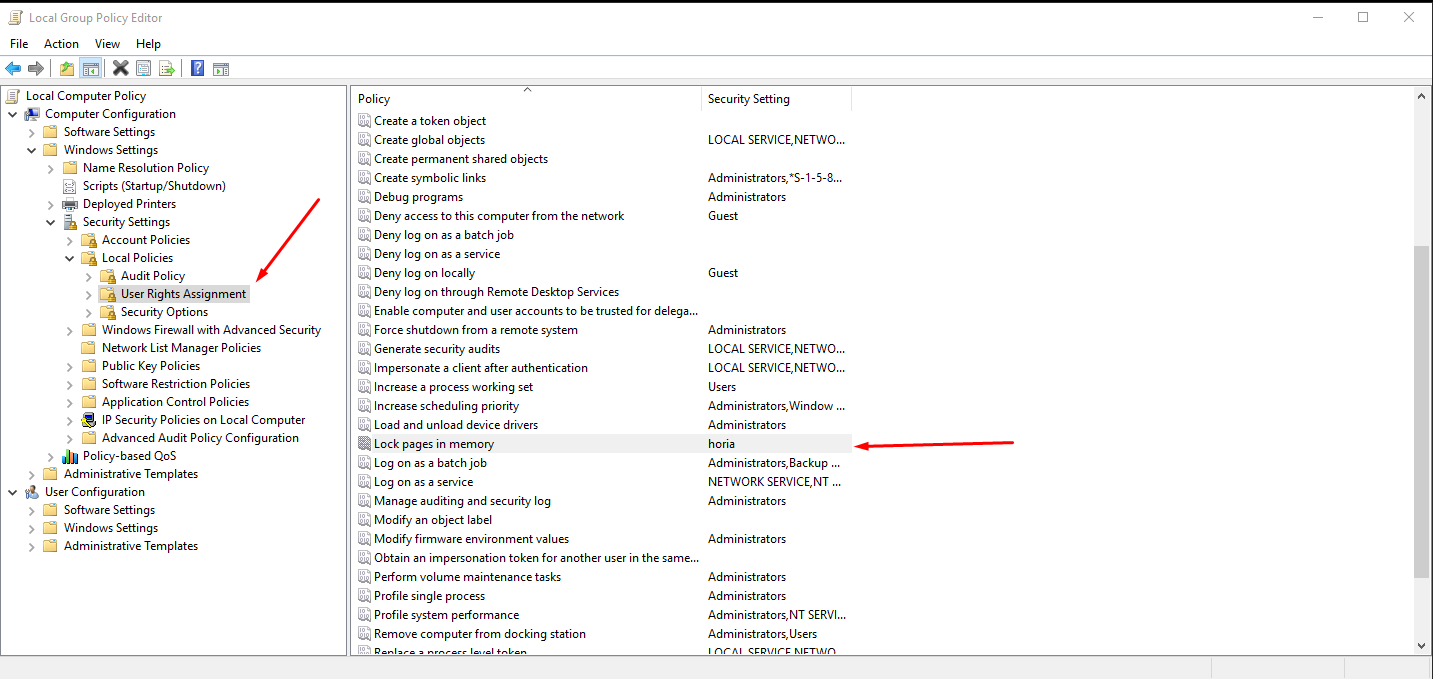
If a reboot doesn't help, then press Win + R to open up the run box, then type gpedit.msc and press enter(you may require admin permissions)
Navigate to the directory shown in the image, and ensure Lock pages in memory is turned on for your user account(horia, in this case, is a user account).
Q: I'm missing the file vcruntime140.dll. Where can I get this?
Answer
Try installing this: https://www.microsoft.com/en-us/download/details.aspx?id=52685
Q: When I run XMR-Stak I get an error: "The application was unable to start correctly (0x000007b)"
Answer
Try installing this: https://go.microsoft.com/fwlink/?LinkId=746572
Paper Wallet / Cold Storage?
Q: Wait, what's Cold Storage?
Answer
The term "cold storage" refers to a wallet that has been created via an offline means.
The preferred way to do this is via a computer than has never ever been connected to the internet, commonly referred to as an air gapped device.
Why is this a thing? If done properly it means it is near impossible for the keys to be secretly intercepted since the data is never viewable by other compute devices.
You see above/elsewhere wallet files are being created via the wallet software, these files might be stored unencrypted, if unencrypted then the keys can be read by malicious software and balances of those wallets, transferred.
Thus to protect against that scenario you could transfer any DEGO balance to one of these cold storage addresses. Please remember to keep secure/secret backups of your keys. If you lose the keys you lose any balance that was transferred to that wallet.
Q: Can I make a paper wallet?
Answer
Yes, you can view the guide here
Q: I made a paper wallet, how do I use it?
Answer
You can check out this guide for steps on how to import your paper wallet into a wallet of your choice(choose a wallet and import the keys).
Q: Can I view the balance of my wallet online?
Answer
Due to DeroGold being a cryptonote-based coin(private), this is not possible.
It should be possible in the future to allow users to give away just their Private View Key to view transactions, but this hasn't been implemented by anyone so far, and would allow that website to see every transaction that you make.
Other
Q: Why does DEGO have such a high amount of tokens/small amount of decimal places?
Answer
Read a great post about the justification for it here.
Q: How can I get some DEGO?
Answer
There are multiple ways to acquire DEGO, for example:
- Mining - see here
- Buying - DEGO is currently available on these exchanges: Cratex, Exbitron and CEX in our Discord
- Bounties - Bounties for developing DEGO software, spreading the word of DEGO, and many other things are often posted in the #bounties channel on [Discord][https://discord.com/invite/JUMUzvh]. Check the pinned messages for current bounties.
- Tips - We use TipBot in our Discord where our members tip each other frequiently
- Rain - TipBot also rains DeroGold as a reward to our active users. Head over to our Discord to find out how ot use TipBot
Q: Is there a web wallet?
Answer
Yes, we have a few. You can learn more about them in this guide.
Q: Are there any light wallets / mobile wallets?
Answer
None are ready for usage right now, but they are being worked on. Check the development channels in Discord to see how people are getting on, and feel free to join in if you're a programmer!
Q: What is RainBorg / how does it work?
Answer
There is an in depth, graphical explanation here
Q: How do I register my wallet on Discord?
Answer
You can check out this guide here.
Q: Where is the blockchain stored?
Answer
On Windows, it is in %APPDATA%/turtlecoin. On Mac and Linux, it is in ~/.turtlecoin.
Q: Is there a blockchain explorer?
Answer
Yes, the offical one is
although there are currently a few other unique ones-
Q: How do I make sure a pool isn't forked?
Answer
You can type in /forked in the #bots channel in the Discord server, which will return with a list of pools which are possibly forked.
Q: I have a question which wasn't answered here, what should I do?
Answer
Join the Discord server, and come to the #help channel, we'll try and fix any issues.